 Skip to main content

If you’re in the process of choosing a new A3 color multifunction printer, it’s rarely as simple as comparing print speeds and paper trays.
What usually makes the decision hard is figuring out how the machine will actually fit into your team’s day-to-day workflow. Will it keep up with scan-heavy departments? Can it handle brochures and booklets without outsourcing? Is the interface easy enough for staff to use without constant IT help?
And now that Lexmark’s newest 9 Series models are part of the larger Xerox ecosystem, many buyers are also wondering how these newer devices fit into modern office fleets.
That’s exactly why we wanted to put together this honest Lexmark CX961se review.
As a print vendor with nearly 40 years of experience helping businesses choose the right office technology, our goal is not to push one brand over another. While we work with Xerox and now Lexmark solutions, the goal of this review is to help you decide whether the Lexmark CX961se A3 color MFP is truly the right fit for your office, workflow, and long-term costs.
In this review, we’ll walk through the CX961se’s key specs, standout features, strengths, tradeoffs, pricing considerations, and the types of workplaces where it makes the most sense.
Table of Contents
- What Is the Lexmark CX961se?
- Lexmark CX961se Key Features
- Pros and Cons
- How Much Does the Lexmark CX961se Cost?
- Who Should Buy the Lexmark CX961se?
- Is the Lexmark CX961se Worth It?
- FAQ
Short Answer: Is the Lexmark CX961se Worth Considering?
The Lexmark CX961se is a 35 ppm A3 color multifunction printer built for large workgroups. It offers fast duplex scanning, flexible finishing, strong media support, and enterprise-level security. Its biggest strengths are its 240 ipm scanner, modern 10-inch touchscreen, strong finishing options, and compatibility with Xerox workflow solutions.
What Is the Lexmark CX961se?
The Lexmark CX961se is an A3 color laser multifunction printer designed for large workgroups and organizations with advanced print and scan needs. It sits within Lexmark’s new 9 Series enterprise lineup, which focuses on versatility, simplicity, and sustainability.
This machine is built for workplaces that need more than everyday printing.
It prints and copies at up to 35 pages per minute in both black-and-white and color, while its single-pass duplex scanner reaches up to 240 images per minute for fast document digitization. The CX961se also supports tabloid/A3 printing, booklet finishing, stapling, hole punching, folding, and media sizes up to 12 x 18 inches. It’s a strong fit for offices that need marketing materials, reports, and internal collateral produced in-house.
Lexmark CX961se Basics
Here are the most important specs:
- Print speed: Up to 35 ppm color and black-and-white
- Monthly Duty Cycle: Up to 150,000 pages per month
- Recommended Monthly Print Volume: Up to 50,000 pages
- Scan speed: Up to 240 ipm duplex
- Paper capacity: Up to 4,750 sheets max
- ADF: 300-sheet single-pass duplex feeder
- Resolution: 1200 x 1200 dpi
- Media support: Up to SRA3 and 12 x 18"
- Base Model Weight: 198.1 lb.
This machine serves not just as a copier but also as a central document workflow hub.
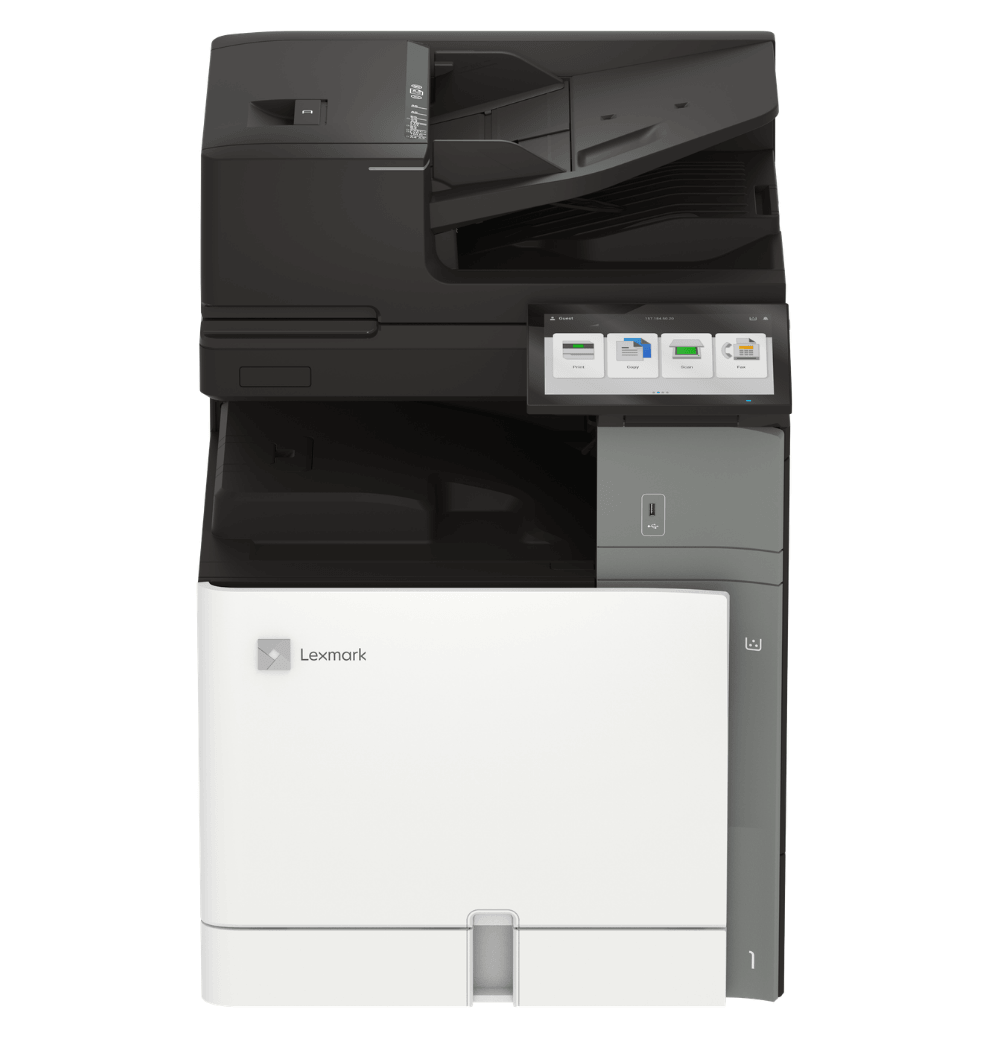
See the picture below for a look at the Lexmark CX961se
Lexmark CX961se Key Features
240 ipm Duplex Scanning for Scan-Heavy Teams
One of the CX961se’s strongest advantages is its 240 images-per-minute single-pass duplex scanner. It’s great for teams that scan large stacks of two-sided documents every day.
The 300-sheet duplex automatic document feeder helps minimize interruptions, while built-in multi-feed detection and skew detection reduce rescans and help maintain clean digital files.
This is the kind of feature that makes a noticeable difference in environments like:
- HR onboarding packets
- legal discovery files
- student records
- healthcare forms
- finance and invoice workflows
Instead of tying up an employee at the device, the CX961se makes it easy to keep large scan jobs moving quickly and accurately.
A Modern 10-Inch Touchscreen That Feels Familiar
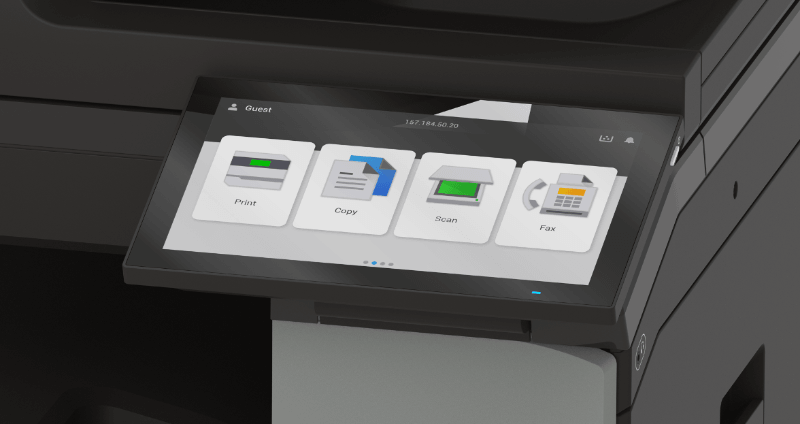
The 10-inch color touchscreen is one of the easiest parts of this machine for teams to adapt to.
Lexmark redesigned the interface around a more modern, tablet-like experience, which makes common tasks like copying, scanning, and retrieving print jobs feel more intuitive.
The home screen prioritizes the tasks teams use most, keeps advanced settings neatly tucked away, and lets users create shortcuts for repetitive tasks.
For offices already moving toward app-driven document workflows, the CX961se keeps that experience simple while expanding what the device can actually do.
Teams can use Lexmark’s eSF apps for scanning, routing, OCR, and shortcut automation, while also accessing the five Xerox ConnectKey apps for Lexmark devices. These include cloud connectors, document conversion, translation, and Workflow Central features.
For offices already moving toward app-driven document workflows, this interface feels modern without becoming complicated.
Advanced Media Handling and Full Finishing
The CX961se is built for offices that need more than plain letter-size printing.
It supports A3 paper for tabloid-size reports, spreadsheets, architectural drawings, and presentation materials. It also handles SRA3, an oversized version of A3, which provides extra room for full-bleed brochures, booklets, posters, and customer-facing marketing pieces before trimming.
Optional finishing includes:
- stapling
- hole punching
- booklet making
- offset stacking
- folding transport
- high-capacity output finishers
This makes it especially strong for:
- school districts
- churches
- architecture firms
- internal marketing departments
- businesses producing customer-facing documents
Instead of outsourcing short-run materials, teams can often keep those jobs in-house.
Enterprise-Level Security Built Into the Device
Security is one of the most compelling reasons to consider the CX961se.
Lexmark’s Secure by Design approach includes features like:
- Trusted Platform Module (TPM)
- secure boot
- continuous firmware verification
- digitally signed firmware
- encrypted storage
- certificate management
- TLS 1.3
- audit logs
- secure syslog
These features are key for regulated industries.
They help IT teams align print devices with broader zero trust, endpoint security, and compliance requirements, which is increasingly important in healthcare, legal, finance, and education environments.
Lexmark CX961se Pros and Cons
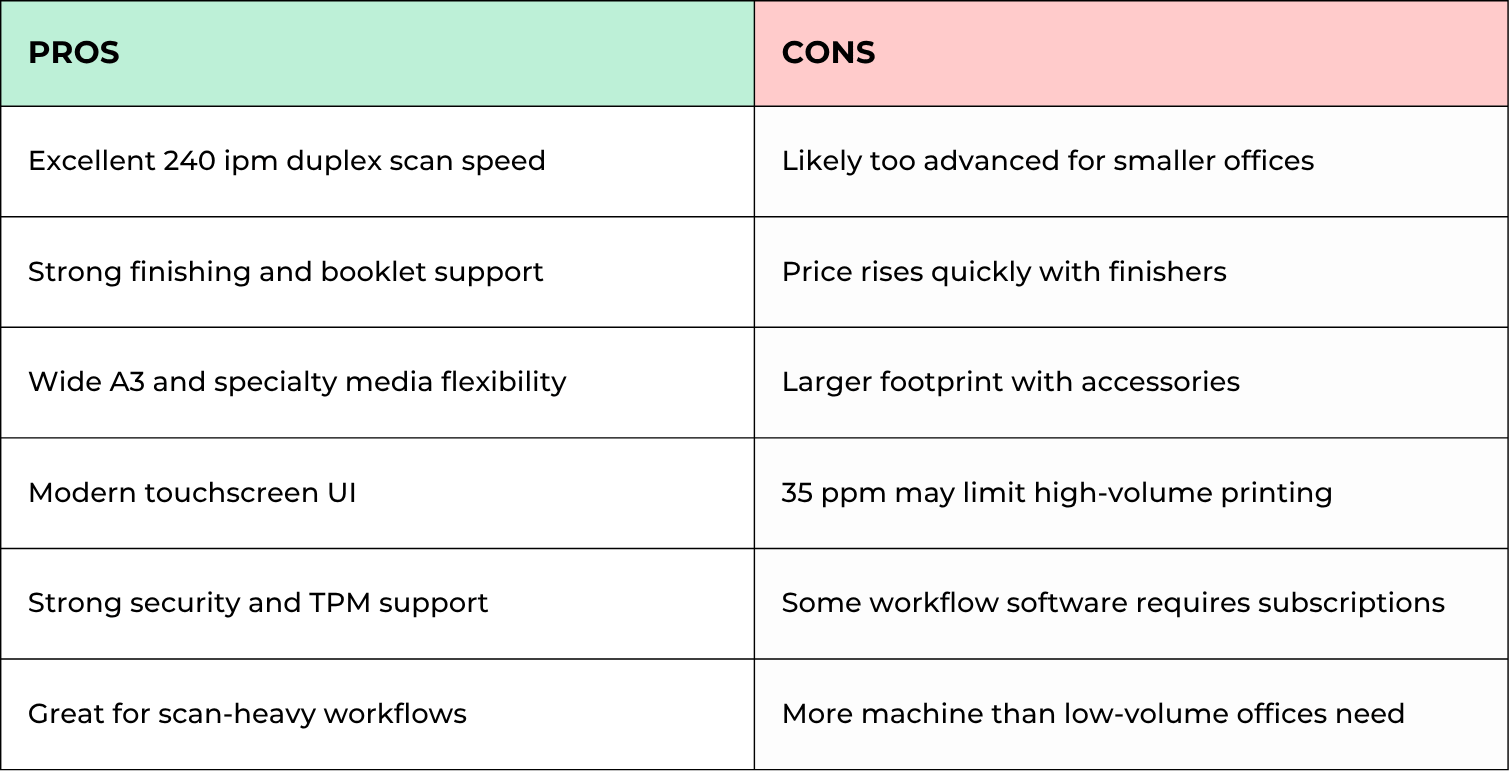
This is a strong workflow-first A3 MFP, but it’s best when its scanning and finishing strengths are actually being used.
How Much Does the Lexmark CX961se Cost?
Because the CX961se is highly configurable, pricing can vary significantly depending on trays, finishers, workflow software, and service coverage.
In most real-world office environments, total cost usually includes:
- base hardware
- additional trays
- stapling/booklet finishers
- service agreement
- cost per print
- software subscriptions
- delivery and installation
A realistic way to evaluate this machine is to look at the total cost of ownership rather than hardware alone.
For organizations that plan to maximize scan speed, finishing, and media flexibility, the higher upfront cost often justifies itself. It offsets the costs of outsourced print jobs, employee labor time, and inefficiencies in document workflows.
Who Should Buy the Lexmark CX961se?
The CX961se is best for organizations that need both advanced document creation and fast digitization.
Best fit
- School districts
- Legal offices
- Healthcare organizations
- Finance departments
- Architecture and engineering firms
- Marketing teams
- Large administrative offices
Probably not ideal for
- Offices under 10 users
- Businesses with mostly letter-size printing
- Low monthly print volumes
- Teams without scan-heavy workflows
- Organizations needing 55+ ppm color output
The strongest value comes when teams actively use the A3 media flexibility + high-speed scanning + finishing combination.
Is the Lexmark CX961se Worth It?
The Lexmark CX961se is one of the strongest new A3 color MFP options for offices that prioritize document workflows over raw print speed alone.
Its biggest strengths are its 240 ipm duplex scanning, strong media versatility, enterprise security posture, and flexible finishing options. For organizations that regularly handle large scan jobs, in-house reports, booklets, and customer-facing materials, it can reduce bottlenecks in ways a standard office copier simply can’t.
For smaller teams, it may be more machine than necessary. But in larger offices, schools, legal teams, and document-heavy departments, it’s a serious contender.
Check out our reviews of the other like models in the 9-Series:
FAQ
Is the Lexmark CX961se good for schools?
Yes. Its fast 240 ipm scanning, booklet finishing, and large paper capacity make it a strong fit for school districts handling student records, reports, and event materials.
How fast is the Lexmark CX961se scanner?
The CX961se scans at up to 240 images per minute in duplex mode, making it one of the faster scan-capable A3 office MFPs in its class.
Can the CX961se print booklets and brochures?
Yes. With the optional booklet finisher and specialty media support, it can handle brochures, booklets, reports, and folded handouts in-house.
Is the Lexmark CX961se secure enough for healthcare or legal offices?
Yes. Its TPM, encrypted storage, secure boot, signed firmware, and certificate controls make it well-suited for security-sensitive industries.
Who should avoid the CX961se?
Smaller offices with basic print needs may be better served by a smaller A4 or entry A3 MFP since this device’s strongest value comes from scan-heavy and finishing-heavy workflows.
See If the CX961se Fits Your Workflow
The best way to know whether the Lexmark CX961se is worth the investment is to map it against your actual print volume, scan workflows, finishing needs, and office growth plans.
If you’re evaluating A3 office MFPs for your business, try our Product Configurator or request a quote to see which Lexmark or Xerox model best matches your environment.
