 Skip to main content

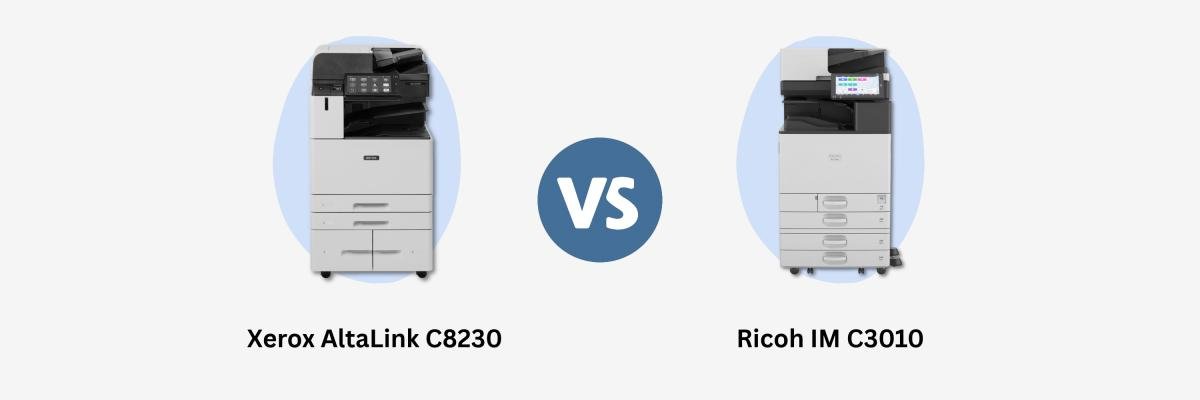
If you compare two copiers that print at the same speed, you’ll find that they can still create very different experiences for your office. One might handle your scanning workload better, while the other includes a document tool you would otherwise pay extra to add.
The Xerox AltaLink C8230 and Ricoh IM C3010 are good examples of this. Both are color multifunction printers that print up to 30 pages per minute, but their scanning capabilities, included features, and management tools deserve a closer look.
At Strategic Technology Partners of Texas (STPT), we bring 40 years of experience helping businesses evaluate office printing needs. We are a Xerox Platinum Partner, so Xerox is our area of expertise. This comparison uses public manufacturer information to explain where each model may fit your business.
Table of Contents
- The short answer
- Key specifications
- Everyday usability and workflow tools
- Scanning and document digitization
- Print quality, paper handling, and finishing
- Security and IT management
- Costs and service
- Which copier fits your office?
- FAQ
Short Answer: Xerox AltaLink C8230 vs. Ricoh IM C3010
The Xerox AltaLink C8230 is worth considering if you want built-in searchable-PDF scanning and Xerox workflow and management tools. If fast batch scanning is a priority, the Ricoh IM C3010 deserves a close look. Both print up to 30 ppm, so the better choice depends on your required configuration, ongoing costs, and service provider.
If you are still comparing manufacturers generally, start with our Xerox vs. Ricoh brand comparison.
How Do the Key Specifications Compare?
Xerox AltaLink C8230 vs. Ricoh IM C3010: Key Specifications
| Specification | Xerox AltaLink C8230 | Ricoh IM C3010 |
|---|---|---|
| Color and black-and-white print speed | Up to 30 ppm | Up to 30 ppm |
| Maximum print resolution | 1200 × 2400 dpi | 1200 × 1200 dpi |
| Duplex scanning speed | Up to 161 images per minute | Up to 300 images per minute |
| Document feeder capacity | 130 sheets | 220 sheets |
| Searchable PDF/OCR | Standard | Requires optional OCR unit |
| Paper capacity | 2,180-sheet four-tray or 3,140-sheet tandem configuration; up to 6,140 with optional feeder | 1,200 sheets standard; up to 4,700 with options |
| Wireless connectivity | Optional wireless kit | Optional wireless LAN |
Sources: Xerox detailed specifications and Ricoh U.S. specifications. Rated speeds depend on job settings and test conditions; they are not results from an STPT side-by-side test.
Print speed measures printed pages, while duplex scanning speed counts scanned sides. Also, maximum duty cycle is a peak capacity figure, not a recommended everyday workload. Ask your provider to confirm an appropriate monthly volume for your configuration.
How Do Everyday Usability and Workflow Tools Differ?
Both copiers offer touchscreen controls, shortcuts, and access to document workflows. Xerox emphasizes personalization and adaptive learning, while Ricoh offers its Smart Operation Panel and Always Current Technology for adding capabilities through updates. But how does each device handle your team’s recurring tasks?
The C8230 includes Xerox tools such as 1-Touch Apps and Adaptive Learning. You can save workflows to simplify repeat jobs, such as scanning an invoice with the same settings each time. Xerox also offers preinstalled AI apps for summarizing documents, converting notes, and redacting information, with limited included use.
Ricoh’s IM C3010 offers user shortcuts and access to apps and cloud services. Its Always Current Technology supports firmware updates and additional capabilities without replacing the machine.
For either copier, ask which connections are included, which require subscriptions, and who sets them up. A cloud feature being available doesn’t mean your preferred workflow is ready immediately.
Both models also support mobile printing. Our guide to printing from your phone explains the basics.
Which Copier Better Supports Scanning and Document Digitization?
Ricoh has the higher published duplex scanning speed and larger document feeder, making it better for frequent batch scanning. Xerox includes OCR for searchable PDFs as standard, while Ricoh requires an optional OCR unit. Consider how much your organization scans and what happens to those files afterward.
Optical character recognition (OCR) identifies text in scanned documents so it can be searched or processed digitally. For example, a searchable PDF can help employees find an invoice number without opening and reading every scanned page.
If your office regularly digitizes large stacks, Ricoh’s feeder and rated scan speed may be valuable. If searchable documents are essential, include the Ricoh OCR option in your quote before comparing costs.
Ask for a demonstration using your own documents. Check scan readability, searchable text, and delivery to the destination your team actually uses.
How Do Print Quality, Paper Handling, and Finishing Compare?
The Xerox AltaLink C8230 has a higher published maximum print resolution. However, don’t rely on resolution alone to determine which copier produces better-looking documents. Both offer larger-format printing and optional finishing. Your paper, files, settings, and chosen accessories determine whether either machine meets your requirements.
Print resolution is measured in dots per inch (DPI). Xerox lists up to 1200 × 2400 dpi, while Ricoh lists up to 1200 × 1200 dpi. Compare samples of your presentations, logos, and fine text rather than choosing solely from those numbers.
Both models support paper up to 12 × 18 inches through appropriate trays and offer finishing options for tasks such as stapling and booklet making. Confirm the paper weights and finishing combinations needed for your jobs.
If your office produces meeting packets, a stapler might save more effort than extra paper capacity. If you have frequent larger print runs, additional trays may be more useful. Our print-finisher guide dives further into finishing options.
How Do Security and IT Management Compare?
Both copiers offer security capabilities, but the level of protection depends on how you configure and manage them. Xerox lists tools for monitoring settings and coordinating devices. Ricoh documents built-in encryption, authentication, and restricted access to output. Your IT team should evaluate both against the same security and management requirements.
Xerox’s Configuration Watchdog monitors selected settings, while Fleet Orchestrator supports distributing configuration and software files across compatible devices. Its Security Dashboard gives administrators a place to review security settings.
Ricoh offers security controls alongside remote support and device-management capabilities. We recommend researching the published features carefully rather than assuming a differently named tool is missing.
Before buying, have IT confirm authentication, secure print release, firmware updates, monitoring, and integration requirements. Also, be sure to check whether each copier is capable of meeting your industry’s rules.
How Do Costs and Service Affect the Decision?
Each printer’s price depends on factors such as configuration, and ongoing expenses depend on usage and contract terms. Compare proposals that meet the same requirements and provide the same service coverage to see which offers the best value.
Total cost of ownership (TCO) is the combined cost of acquiring, operating, and maintaining a copier over the period you use it. A lower equipment price may be offset by software charges, page costs, or separately billed repairs.
Ask each provider to itemize:
- Equipment, delivery, installation, and required accessories.
- OCR, workflow software, and app subscriptions.
- Lease length and total payments, if leasing.
- Color and black-and-white page charges, minimums, and overages.
- Included toner, parts, labor, and service coverage.
For offices in North Texas or Southern Oklahoma, also confirm who services your location and what response expectations apply. Service commitments belong to the provider and contract, so compare them separately from copier specifications.
For more information on the true cost of owning a printer, read How Much Does a Printer/Copier Cost?.
Which Copier Is the Better Fit For Your Office?
When should you consider the Xerox AltaLink C8230?
Consider the C8230 if standard searchable-PDF scanning, Xerox workflow tools, and compatible fleet-management features match your needs. It’s also a worthwhile choice if your employees already use Xerox devices and your IT team wants to build on that environment.
When should you consider the Ricoh IM C3010?
Consider the IM C3010 if you frequently scan large batches, as its larger feeder and faster scanning speed can be beneficial. It also deserves consideration if your existing Ricoh workflows and service relationship work well. Include any necessary OCR and software options in the comparison.
If neither configuration supports your workload or budget, broaden your shortlist instead of forcing the choice.
FAQ
Is the Xerox AltaLink C8230 faster than the Ricoh IM C3010?
Both print up to 30 ppm. Ricoh lists a higher duplex scanning speed: up to 300 images per minute versus Xerox’s 161. Actual performance depends on the job and settings.
Can both copiers create searchable PDFs?
Yes. Xerox includes searchable-PDF OCR as standard, while Ricoh requires its optional OCR unit. Confirm that feature is included in the proposed configuration.
Which copier is cheaper to own?
There is no universal winner. Compare equivalent equipment configurations, software charges, page rates, and service coverage over the same ownership or lease period.
What should I compare before choosing?
Confirm your monthly print volume, scanning workload, paper needs, required integrations, and security requirements. Then compare configured quotes and test your most common jobs.
Ready To Choose a Copier That Fits Your Office?
You now have a clearer picture of the tradeoffs: Xerox includes searchable-PDF scanning and offers its workflow and management tools, while Ricoh brings a larger feeder and higher rated scanning speed. The next step is to check those capabilities against your daily work and budget.
At STPT, we help businesses across North Texas and Southern Oklahoma evaluate Xerox configurations and understand equipment and service costs. Share your monthly volume, scanning needs, and must-have features so we can help you decide whether the C8230 fits your office.
