 Skip to main content


Are you working remotely or helping your kids print school assignments, or simply need a reliable printer for occasional documents? The right laser printer can make all the difference. However, finding the perfect laser printer is easier said than done. In 2026, there are thousands of options, and it can be overwhelming to know where to start.
That’s why we’ve compiled this list. At Strategic Technology Partners of Texas (STPT), we leverage 40 years of expertise to help you navigate the best options available. We know that consumers are looking for high-quality, efficient, and or cost-effective printer options.
This blog will guide you through the top five best laser printers for home use, highlighting key features, specifications, and why these models stand out.
In this guide, we'll look at the best laser printers for home use in 2026, explain who each printer is best suited for, and help you understand what features matter most before you buy.
Note: The prices we listed are approximations and will vary depending on where you purchase.
Table of Contents
- What Is the Best Laser Printer for Home Use?
- Why Choose a Laser Printer for Home Use?
- How STPT Chose the Best Printers for This List
- Best Laser Printers for Home Use in 2026
- How to Choose the Right Home Laser Printer
- FAQ
Short Answer: What Is the Best Laser Printer for Home Use in 2026?
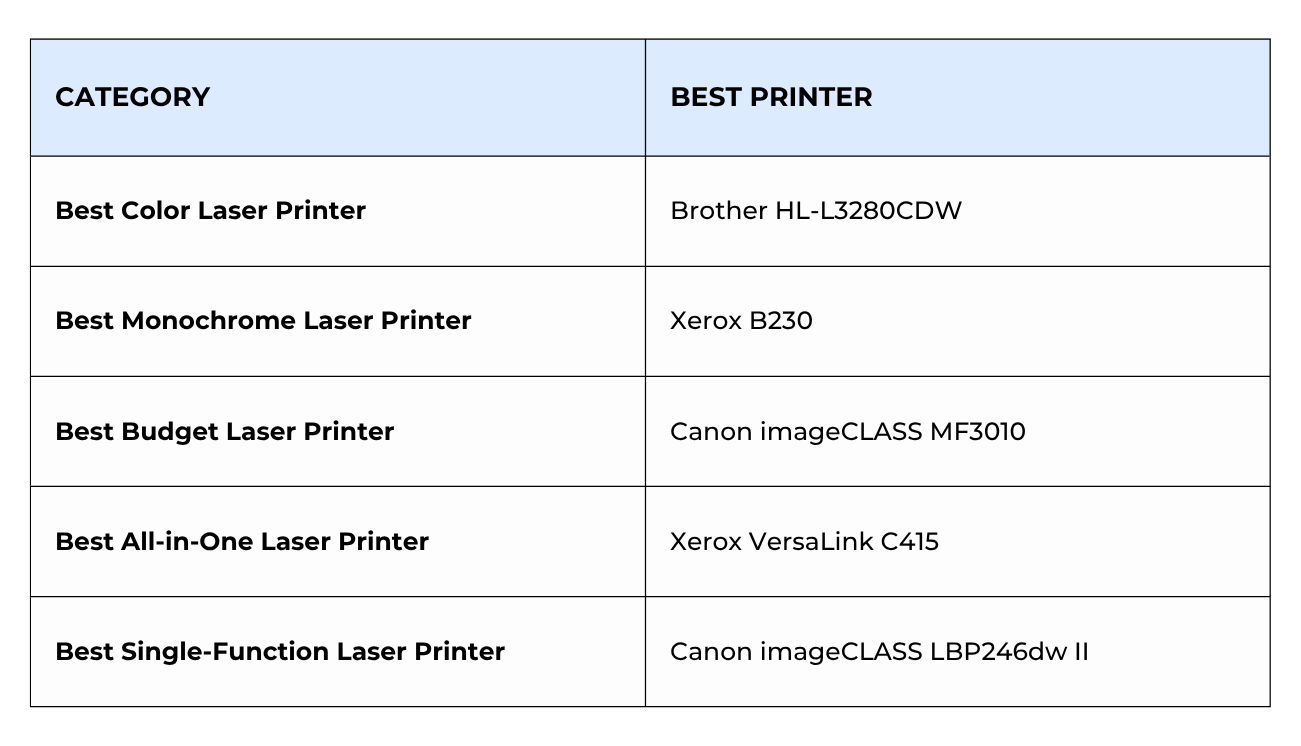
The best laser printer for home use depends on your needs. The Brother HL-L3280CDW is one of the best color laser printers for home users, while the Xerox B230 is an excellent monochrome option for people who primarily print documents. Home users should choose a printer based on print volume, color requirements, budget, and whether they need scanning or copying features.
Why Choose a Laser Printer for Home Use?
Laser printers are a practical choice for home users who regularly print documents. Unlike inkjet printers, laser printers use toner instead of liquid ink. Toner cartridges typically produce thousands of pages before replacement, which can help lower your long-term printing costs. They also tend to have a higher print speed, which is crucial when you need to print multiple documents quickly.
Another advantage is reliability. Because toner doesn't dry out like ink can, laser printers are often a better choice for people who print occasionally. If you only print a few times per month, your printer will generally be ready when you need it.
Laser printers also produce crisp text, fast print speeds, and professional-looking documents.
To learn more about the difference between laser and inkjet printers, check out our blog comparing them.
How STPT Chose the Best Printers for This List
Here are the factors that we considered when making this list:
- Functionality: We evaluated whether each printer offers the features home users actually need, including printing, scanning, copying, and mobile printing.
- Brand Reputation and Support: We considered brand reputation, software support, warranty options, and long-term reliability.
- Print Quality: A printer should consistently produce sharp text and professional-looking documents.
- Cost of Ownership: We also considered toner costs, expected page yields, and ongoing operating expenses.
The Best Laser Printers for Home Use in 2026
Without further ado, here are the top six laser printers across various categories to suit different needs and budgets:
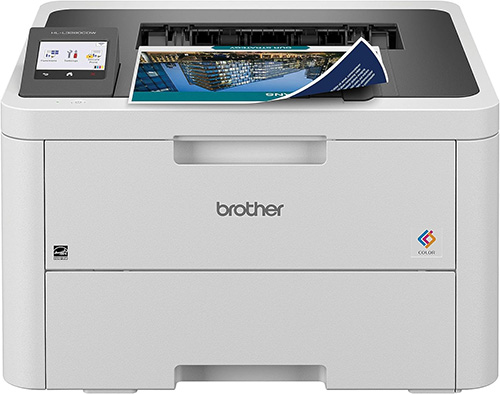
1. Best Color Laser Printer: Brother HL-L3280CDW
Why We Recommend It
The Brother HL-L3280CDW delivers vibrant color output, reliable wireless connectivity, and affordable operating costs. It's a great option for users who occasionally need color documents without stepping up to a more expensive office-class printer.
Basic Specifications:
- Print Speed: Up to 27 pages per minute (ppm)
- Recommended Monthly Print Volume: Up to 1,500 pages
- Base Model Dimensions (WxDxH): 16.2” x 15.5” x 13.6”
- Base Model Weight: Around 43 pounds
- Cost: Starting around $345 at Brother or Amazon
Best For: Students, remote workers, families, and home users who occasionally need color printing.
With print speeds of up to 27 ppm and automatic duplex printing, the HL-L3280CDW can easily handle everyday documents, school projects, and home office tasks. The 250-sheet paper tray also helps reduce interruptions when printing larger jobs.
Built-in dual-band Wi-Fi, Ethernet, Wi-Fi Direct, and mobile printing support make it easy to print from virtually any device. The manual feed slot adds flexibility for envelopes, labels, and cardstock.
One limitation is that this is a print-only device, so users who need scanning or copying functions should consider an all-in-one printer.
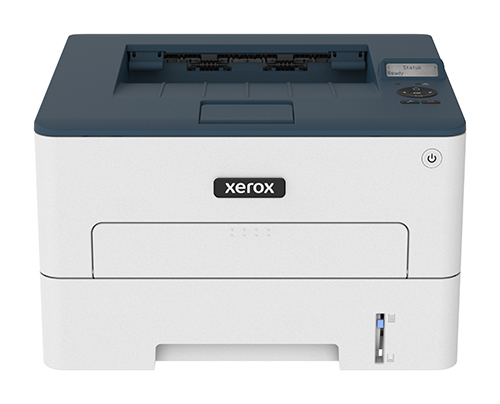
2. Best Monochrome Laser Printer: Xerox B230
Why We Recommend It
The Xerox B230 combines fast print speeds, a compact footprint, and low operating costs. It’s an excellent choice for users who primarily print black-and-white documents.
Basic Specifications:
- Print Speed: Up to 36 pages per minute (ppm)
- Recommended Monthly Print Volume: Up to 2,500 pages
- Base Model Dimensions (WxDxH): 14” x 13.2” x 8.5”
- Base Model Weight: Around 15 pounds
- Cost: Starting around $179 at Xerox or Amazon
Best For: Home offices, students, and anyone who primarily prints text documents.
The Xerox B230 delivers impressive performance for its price. With print speeds of up to 36 ppm and support for automatic duplex printing, it can quickly handle everything from reports and forms to shipping labels and school assignments.
Its compact size makes it easy to fit into smaller workspaces, while built-in Wi-Fi, AirPrint, Mopria, and Wi-Fi Direct simplify printing from laptops, tablets, and smartphones.
The biggest drawback is that it only prints in black and white, making it less suitable for users who regularly need color output.
Check out our Xerox B230 Review for a more detailed look at this model’s features.
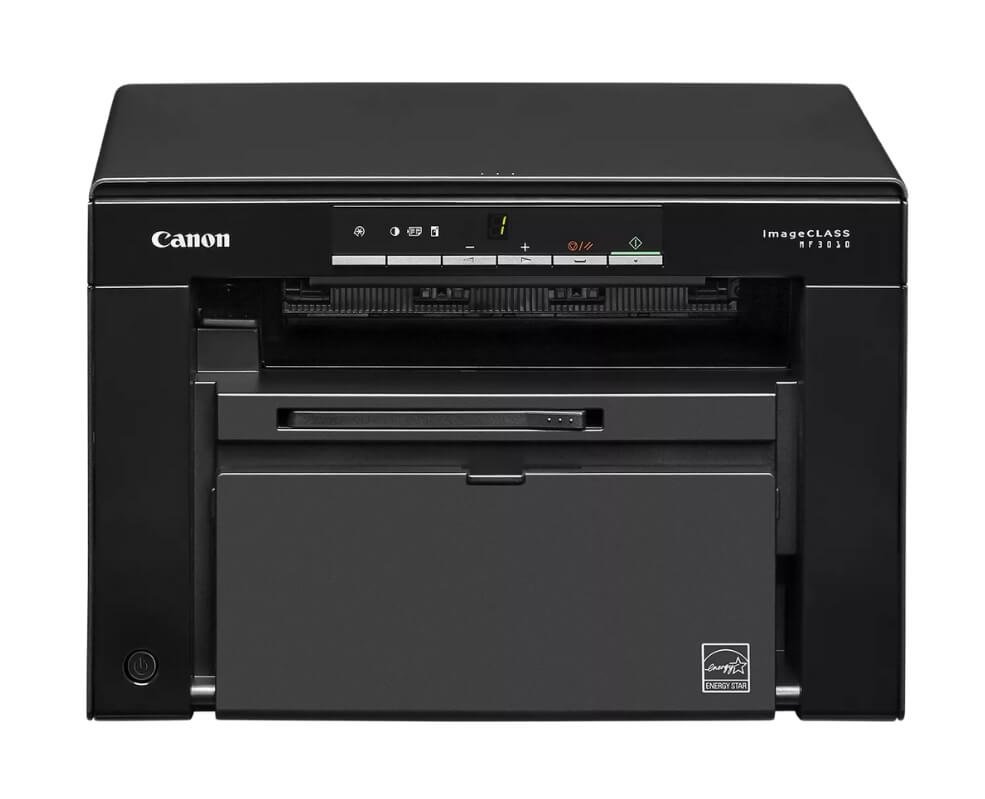
3. Best Affordable Laser Printer: Canon imageCLASS MF3010
Why We Recommend It
The Canon imageCLASS MF3010 combines printing, copying, and scanning capabilities at an affordable price. Its compact design also makes it a strong choice for smaller home workspaces.
Basic Specifications:
- Print Speed: Up to 19 pages per minute (ppm)
- Recommended Monthly Print Volume: Up to 1,000 pages
- Base Model Dimensions (WxDxH): 14.7” x 10.9” x 10”
- Base Model Weight: Around 16.8 pounds
- Cost: Starting around $149 at Canon or Amazon
Best For: Budget-conscious home users who want print, copy, and scan capabilities in one device.
Although it is the most affordable printer on this list, the MF3010 still offers useful multifunction capabilities. It can print, copy, and scan while maintaining a compact footprint that fits easily on a desk or shelf.
Canon includes enough toner in the value pack for up to 2,300 pages, which helps keep costs down early on. The ability to create searchable PDF files through scanning is also a useful feature for students and remote workers.
The main limitation is its lack of wireless connectivity, as it relies primarily on a USB connection.
4. Best All-in-One Laser Printer: Xerox VersaLink C415/DN
Why We Recommend It
The Xerox VersaLink C415/DN combines fast print speeds, advanced scanning capabilities, strong security features, and exceptional workflow functionality. It offers many of the features typically found in larger office printers.
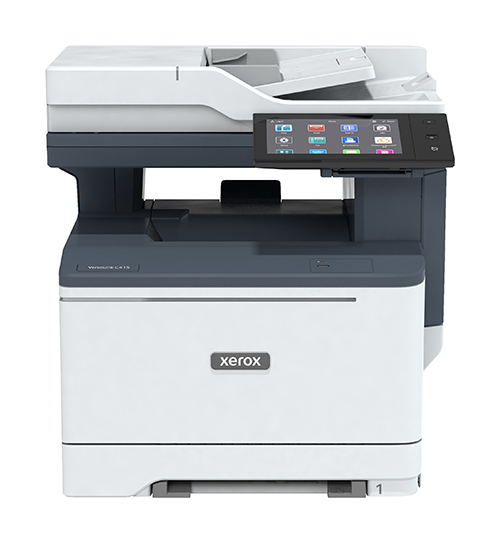
Basic Specifications:
- Print Speed: Up to 42 pages per minute (ppm)
- Recommended Monthly Print Volume: Up to 10,000 pages
- Base Model Dimensions (WxDxH): 18.9” x 18.7” x 19.3”
- Base Model Weight: Around 59.5 pounds
- Cost: Starting around $999 at Xerox or Amazon
Best For: Home-based professionals, power users, and users who want office-level features at home.
The VersaLink C415 delivers impressive performance with print speeds of up to 42 ppm and a large 7-inch touchscreen that feels more like a tablet than a traditional printer interface. It also includes print, copy, scan, and fax capabilities in a single device.
Beyond basic functionality, the C415 stands out for its advanced security features, cloud connectivity, and access to Xerox workflow apps. Its single-pass duplex scanner can quickly scan both sides of a document in a single pass, helping save time on larger jobs.
Its biggest drawback is its price, which may be more than many casual home users need.
For a more detailed look at this printer, check out our Xerox Versalink C415 Review.
5. Best Single-Function Laser Printer: Canon imageCLASS LBP246dw II
Why We Recommend It
The Canon imageCLASS LBP246dw II focuses on speed, reliability, and ease of use without adding unnecessary features. It is ideal for users who only need high-quality document printing.
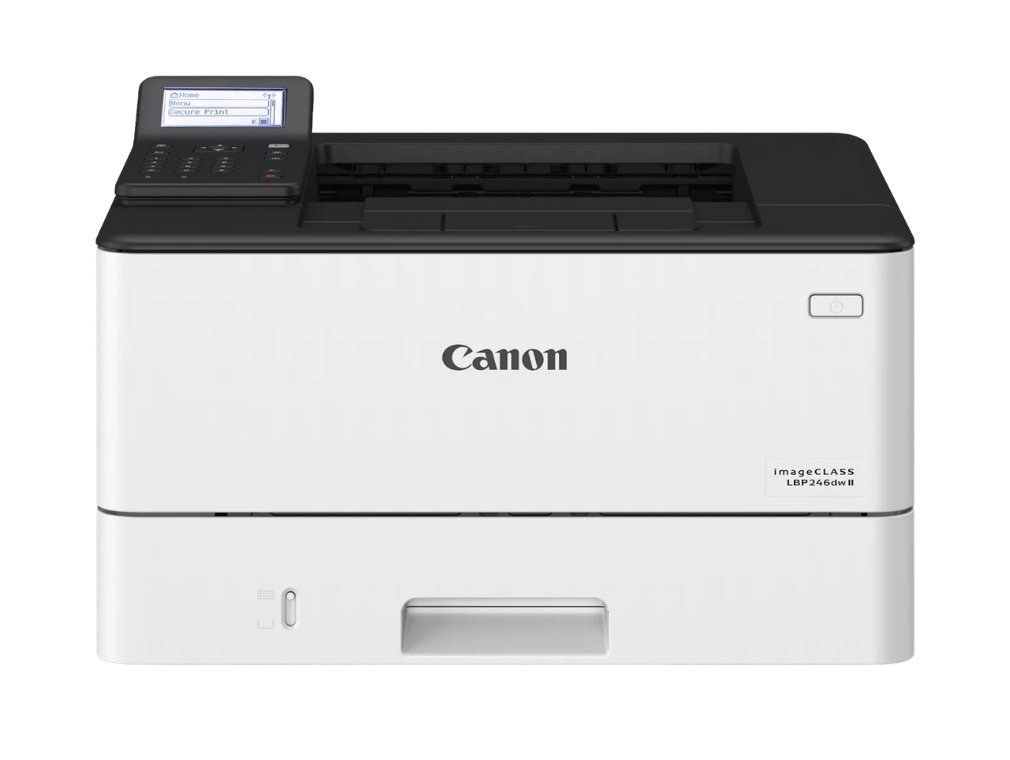
Basic Specifications:
- Print Speed: Up to 42 pages per minute (ppm)
- Recommended Monthly Print Volume: Up to 4,000 pages
- Base Model Dimensions (WxDxH): 15.7” x 14.7” x 9.8”
- Base Model Weight: Around 19.2 pounds
- Cost: Starting around $250 at Canon or Amazon
Best For: Home offices and users who want fast, dependable document printing without scanning or copying features.
The LBP246dw II is designed for productivity. It prints up to 42 pages per minute and produces its first page in about five seconds, making it one of the fastest printers on this list.
Wireless connectivity, automatic duplex printing, and support for a wide range of media types help make everyday printing convenient. Users with higher print volumes can also take advantage of high-yield toner cartridges that can produce up to 10,200 pages.
Because it is a print-only device, users who need scanning, copying, or color printing should look elsewhere.
Key Features to Look for in a Laser Printer
When comparing laser printers, pay close attention to the following features:
Print Speed
Faster print speeds help maintain productivity, especially if you regularly print larger documents.
Size and Space Requirements
Always verify the printer's dimensions before purchasing. Some laser printers require significantly more space than they appear to need.
Ease of Use
Features such as touchscreen displays, mobile printing, and intuitive setup processes can make a noticeable difference in the ownership experience.
Paper Handling
Paper capacity, media compatibility, and automatic duplex printing all contribute to convenience and efficiency.
Cost Per Page
A lower purchase price does not always mean a lower overall cost. Toner yield and replacement costs can significantly impact long-term ownership expenses.
FAQ
What is the best laser printer for home use?
For most home users, the best laser printer depends on whether you need color printing, scanning capabilities, or the lowest operating costs.
Is a laser printer worth it for home use?
Yes. Laser printers typically offer faster print speeds, lower cost per page, and toner that does not dry out during long periods of inactivity.
Which printer is better for occasional use: laser or inkjet?
Laser printers are generally better for occasional use because toner does not dry out like ink cartridges.
What is the most reliable laser printer brand?
Brother, Xerox, Canon, and HP are consistently recognized as reliable laser printer manufacturers.
Which lasts longer: a laser printer or an inkjet printer?
Laser printers often last longer because they are designed for higher print volumes and experience fewer issues related to dried ink.
Find the Right Laser Printer for Your Needs
The best laser printer for home use depends on how you print. Some users need affordable black-and-white printing for documents and schoolwork, while others want color output, scanning capabilities, or faster print speeds for a home office.
The printers on this list are all strong options, but the right choice comes down to your budget, print volume, and the features you use most often.
If you're still comparing models, our Product Configurator can help. You can explore Xerox printers, compare specifications, review features, and narrow down your options based on your needs.
Ready to compare printers? Use our Product Configurator to find and compare Xerox models that fit your budget, workspace, and printing requirements.
