 Skip to main content

You’ve just hit “print” and walk over to the printer. Unfortunately, your document is either buried under a stack of someone else’s pages or nowhere in sight.
This can be especially frustrating in a busy office where time is precious. A print environment with lost documents, wasted prints, and sensitive information left out in the open is a sign that it isn’t working as well as it should.
Follow Me Printing helps solve this problem.
We’ve specialized in simplifying and securing print environments for nearly 40 years. In this guide, we’ll walk you through what Follow Me Printing is, how it works, and whether it’s a good fit for your organization.
Table of Contents
- What is Follow Me Printing? (Short Answer)
- How does Follow Me Printing work?
- Follow Me Printing vs. Traditional Printing
- What are the benefits of Follow Me Printing?
- Who is Follow Me Printing best for?
- How do you set up Follow Me Printing?
- What is push printing?
- How does Follow Me Printing improve security?
- FAQ
- Is Follow Me Printing right for you?
What is Follow Me Printing? (Short Answer)
Follow Me Printing is a secure print method that ensures your documents are held in a secure central queue and only print after you authenticate at a device. Instead of printing automatically, you can release your job at any connected printer using a badge, PIN, or mobile app.
This setup keeps your documents from being left unattended in the output tray and prevents wasted prints when users accidentally send jobs to the wrong printer.
With Follow Me Printing, you’re sending a print job instead of just releasing it.
How Does Follow Me Printing Work?
Follow Me Printing works by routing print jobs through a secure, centralized system instead of sending them directly to a single printer. It relies on specialized applications like Y Soft or PaperCut.
Here’s a simple breakdown of the process:
- User sends a print job to a central print queue instead of a specific printer.
- The job is securely stored, and the system retains it until the user is ready to print.
- User goes to any connected printer & is no longer tied to one device.
- User authenticates with a badge, PIN, username/password, or mobile app.
- The printer releases the job, and the document prints immediately after authentication.
This process gives users flexibility while keeping documents secure. The system manages print jobs centrally, users control when they print, and organizations get visibility into usage.
Below is an example of someone using a Y Soft badge to release a print job.

Follow Me Printing vs. Traditional Printing
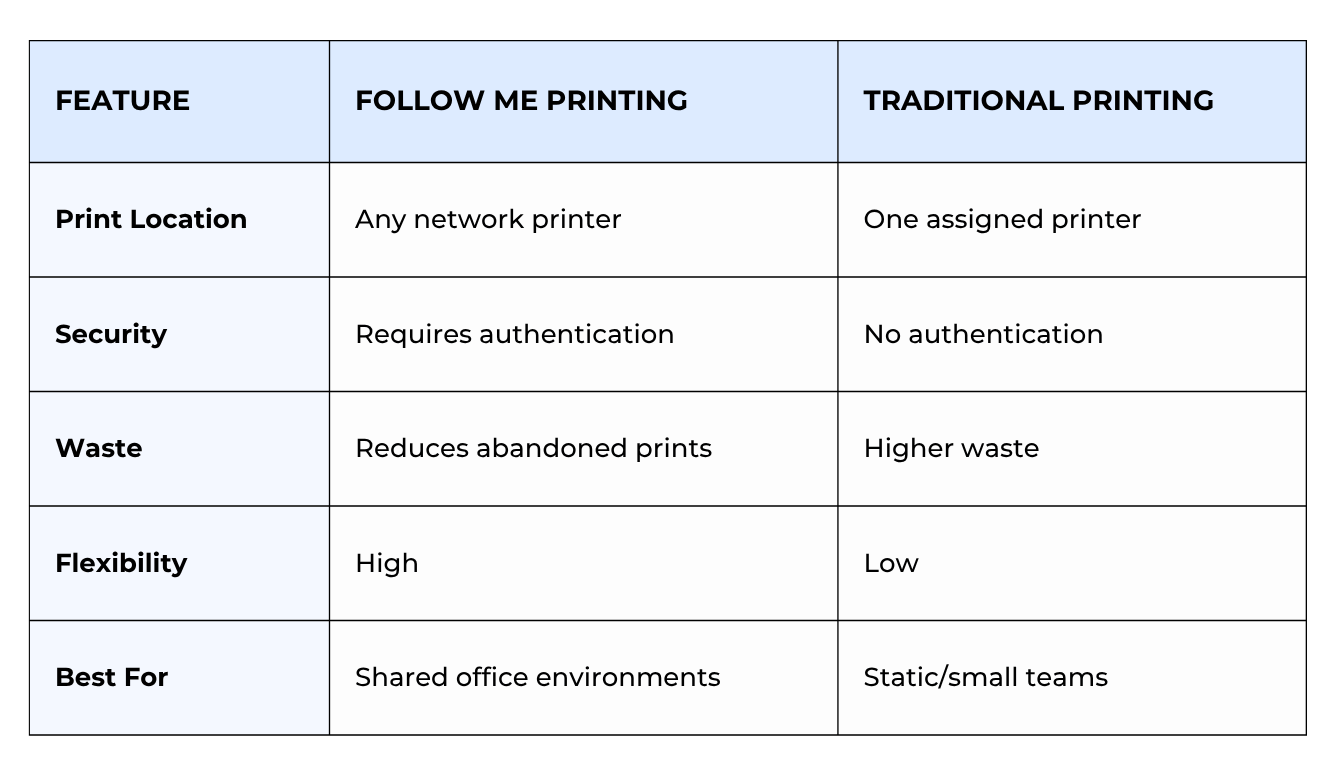
Traditional printing sends jobs directly to a device, while Follow Me Printing holds jobs until you are ready.
This change makes a difference in how secure, efficient, and flexible your print environment can be.
What Are the Benefits of Follow Me Printing?
Follow Me Printing not only makes printing more convenient but also directly impacts your overall cost, security, and workflow efficiency.
Here are the most noticeable benefits:
Better Document Security
Documents print only when you are present, which reduces the chance of sensitive information being left out in the open.
Less Print Waste
If a print job goes unclaimed, it doesn’t automatically print, which reduces paper and toner usage.
More Flexibility for Users
Employees can print from any device, which is especially useful in hybrid or shared workspaces.
Improved Cost Control
Print management software can track usage, help organizations identify waste, and enforce policies.
Less Frustration in Busy Offices
You avoid having to sort through stacks of documents or re-printing lost jobs.
Who Is Follow Me Printing Best For?
Follow Me Printing is incredibly useful in environments where printing is shared, mobile, or security-sensitive.
It’s ideal for:
- Mobile or hybrid teams: Employees who move between offices or workspaces can print anywhere.
- Security-focused industries: Healthcare, legal, and financial organizations often require tighter control over documents.
- Busy office environments: Offices with shared printers can reduce confusion, reprints, and wasted time
- Organizations looking to reduce costs: Less waste and better tracking can save you a lot of money over time.
For example, if your team regularly deals with misplaced documents, reprints, or security concerns, Follow Me Printing can solve these issues.
How Do You Set Up Follow Me Printing?
Setting up Follow Me Printing depends on the software and printer you use. Generally, the steps are as follows:
- Choose print management software: Solutions like Y Soft SAFEQ or PaperCut enable Follow Me Printing functionality.
- Set up a central print server or cloud system: This is where print jobs are stored and managed.
- Configure user authentication methods: Badge readers, PIN codes, or mobile authentication are most common.
- Connect your printers: Devices must be networked and compatible with your software.
- Test and optimize the workflow: IT teams typically fine-tune settings for performance, security, and usability.
Each brand and model may have unique requirements, so consulting your printer’s documentation or partnering with an expert (like us!) ensures a smooth setup process.
What Is Push Printing?
Push printing or direct printing is the traditional method most offices are used to. You send a document directly to a specific printer, and it prints immediately without authentication or delay.
While simple, this method lacks the security and flexibility of Follow Me printing.
How Does Follow Me Printing Improve Security?
Printer security is an often-overlooked but real risk for many organizations.
According to the Quocirca 2025 Print Security Landscape report, 56% of organizations still experience data loss due to insecure printing practices. A major contributor is the “human factor”.
Follow Me Printing reduces the risk of human error by:
- Requiring authentication before printing: Only the intended user can release the document.
- Preventing unattended documents: Nothing prints until you’re physically present.
- Improving accountability: Systems track who prints what and when.
- Supporting compliance efforts: Important for industries with strict data regulations.
Follow Me Printing secures the release process, reduces exposure risk, and helps organizations stay in control of sensitive information.
Check out our blog on 5 Common Printer Security Mistakes (With Solutions) for ways you can lower the chances of a printer cyberattack.
Follow Me Printing, Print Management Software, and MPS
Follow Me Printing can work alongside other solutions as part of a larger print strategy.
When combined with print management software and Managed Print Services (MPS), it becomes even more effective.
- Print management software controls and tracks printing behavior
- Follow Me Printing secures and routes print jobs
- Managed Print Services optimize the entire environment
Together, these solutions create a more efficient, secure, and manageable print environment.
FAQ
What is a Follow Me printer?
A Follow Me printer is any network-connected device that allows users to release print jobs after authentication instead of printing automatically.
Can Follow Me Printing be tracked?
Yes. Most systems track user activity, print volume, and usage patterns to improve security and cost control.
Is Follow Me Printing the same as secure print?
Not exactly. Secure print usually applies to a single device, while Follow Me Printing allows users to release jobs at any connected printer.
Is Follow Me Printing Right for Your Business?
Many organizations will eventually deal with lost documents, wasted supplies, and growing concerns about security.
Now that you understand how Follow Me Printing works, you can see that it’s a way to take control of your print environment. It gives your team flexibility, reduces unnecessary costs, and helps prevent the kinds of mistakes that lead to bigger problems down the line.
At Strategic Technology Partners of Texas, we’ve helped businesses across North Texas implement solutions like this in a way that actually fits how their teams work.
If you’re starting to think your current setup could be more secure or efficient, consider requesting a Print Management Consultation.
We’ll take a look at your current environment, answer your questions, and help you determine if Follow Me Printing or something else makes the most sense for your business.
