 Skip to main content


Printers don’t just print anymore. With the right apps, they scan, email, secure data, and even automate workflows. But not all printer app platforms are created equal. If you’re a business trying to decide between Xerox App Gallery and Canon’s uniflow, you’re likely wondering which one offers more in terms of productivity and security.
As longtime Xerox partners who’ve seen firsthand how businesses use these apps day-to-day, we’ll be upfront: we specialize in Xerox solutions. That said, we also know that anyone making this choice deserves an honest look at how Xerox compares with Canon. Our goal here isn’t to push you blindly in one direction but rather to give you the clear information you need to make the right call for your business.
By the end of this article, you’ll understand what Xerox App Gallery and Canon uniFLOW are, how they compare in key areas such as usability, integrations, security, and cost, and which platform might be the better fit for your needs.
Table of Contents
- Overview of Xerox App Gallery vs Canon uniFLOW
- Usability & User Experience
- Integrations & Workflow Automation
- Security & Compliance
- Cost & Flexibility
- Decision Framework: Which One Is Right for You?
- Conclusion: Test Out Both App Platforms
Overview of Xerox App Gallery vs Canon uniFLOW
Xerox App Gallery
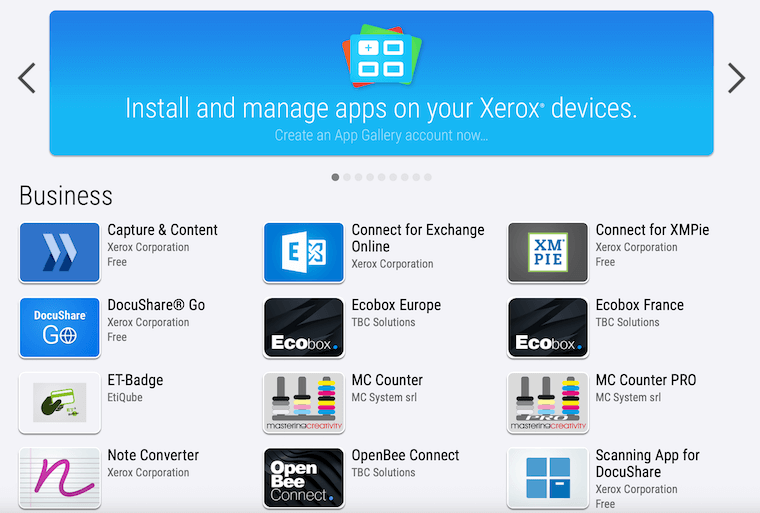
Xerox App Gallery is essentially Xerox’s app store for multifunction printers (MFPs). With about 40+ apps across categories like productivity, security, healthcare, education, and legal, businesses can download apps to extend what their printer can do. For example, Xerox Auto Redaction automatically removes sensitive information, while Translate & Print converts documents into different languages instantly. Apps are plug-and-play, designed to make everyday tasks faster without heavy IT involvement.
Canon uniFLOW
Canon uniFLOW, on the other hand, isn’t just an app gallery. It’s a broader platform focused on print and scan management. Available in on-premise, online, or hybrid versions, uniFLOW centralizes printing, scanning, and security controls.
It also offers vertical-specific solutions, like healthcare add-ons that integrate with electronic health record (EHR) systems or legal features like Bates Stamping. Rather than picking from individual apps, businesses often subscribe to a workflow package (Essentials, Connectors, Workflows, or Advanced Workflows).
So, in short: Xerox App Gallery = flexibility and choice. Canon uniFLOW = centralized control and managed workflows.

Usability & User Experience
Xerox ConnectKey-enabled devices feature a tablet-like interface that’s intuitive and customizable. Apps look and feel like smartphone apps, so onboarding staff is straightforward. You can pin apps like DocuShare Go or Translate & Print to your printer’s home screen, making them instantly accessible.
Canon’s uniFLOW is also user-friendly but is more workflow-centric. Employees log in to a unified portal where they can release secure print jobs, scan to cloud destinations like OneDrive or SharePoint, or use predefined scan workflows. While powerful, it often requires more setup and training to maximize value compared to Xerox’s plug-and-play model.
Verdict: Xerox wins for ease of use and quick adoption; Canon wins for consistency across larger, centralized workflows.
Integrations & Workflow Automation
Xerox App Gallery apps integrate with popular cloud platforms like Microsoft 365, Google Drive, Box, Dropbox, and SharePoint. Beyond that, specialized apps like Connect for DocuSign or Capture & Content let you tie directly into industry platforms and automate tasks like document routing and metadata extraction.
Canon uniFLOW shines in document workflow automation. Its Advanced Workflows package lets you auto-route files to multiple destinations, apply OCR, and even extract metadata to populate SharePoint fields automatically. Add-ons like the Healthcare Connector streamline patient onboarding, while the Legal Connector handles e-filing and Bates Stamping.
Verdict: Both are strong, but Xerox offers more flexibility with industry-specific apps, while Canon offers deeper workflow automation.
Security & Compliance
Xerox devices come with built-in multi-layered security: data encryption, secure print release, and user authentication. Apps like Auto Redaction help with HIPAA and GDPR compliance by automatically removing sensitive data before documents are shared.
Canon uniFLOW also takes security seriously. It supports secure document scanning, secure print queues, and advanced authentication (card login, PIN codes, LDAP, and Azure AD). For healthcare providers, uniFLOW offers HIPAA-aligned controls and integrates with EHR systems.
Verdict: Both platforms are strong on security, but Canon edges ahead with its centralized, compliance-driven approach for industries like healthcare and government.
Cost & Flexibility
Xerox App Gallery apps are available individually, with some free options (like Scan to Cloud Email) and others sold on a subscription basis. This à la carte model makes it easy for small businesses to start with a few apps and scale as needed.
Canon uniFLOW typically involves a subscription model (Essentials, Workflows, Advanced Workflows) with optional add-ons for specific industries. While powerful, this structure can feel more rigid and may be overkill for smaller businesses that just need a few simple apps.
Verdict: Xerox offers more cost flexibility for smaller and mid-sized businesses, while Canon uniFLOW is better suited for enterprises with complex workflow needs.
Which One Is Right for You?
Ask yourself these questions:
- Do you need a few targeted apps to make everyday tasks easier (like translation, secure email, or quick redaction)? → Xerox App Gallery is your best fit.
- Do you need a centralized workflow platform with advanced automation and compliance features across multiple locations? → Canon uniFLOW will likely deliver more value.
- Is ease of adoption important, especially if your staff isn’t particularly tech-savvy? → Go with Xerox App Gallery.
- Are you in a regulated industry (healthcare, government, legal) with strict compliance needs? → Canon uniFlow may be the safer bet.
Conclusion: Test Out Both App Platforms
Both Xerox App Gallery and Canon uniFLOW aim to make printers more than just printers, but they take different paths. Xerox focuses on simplicity, flexibility, and industry-specific apps that businesses can add as needed. Canon focuses on centralized management and advanced workflows tailored to complex organizations.
If your business values speed, flexibility, and plug-and-play productivity, Xerox App Gallery is hard to beat. If you need deep workflow automation and strict compliance across multiple facilities, Canon uniFLOW may be a better match.
If you’d like to explore Xerox App Gallery apps firsthand, we offer a free trial so you can test productivity apps before making a decision.
