Skip to main content


When people talk about business revenue, they usually bring up sales strategies, marketing plans, or operational efficiency. Very rarely do they point to the printer in the corner of the office. But did you know your copier or printer plays a much bigger role in your revenue than you might realize?
Printing equipment can boost your marketing impact, operational cost savings, and bring entirely new revenue opportunities. And for many businesses, the key to unlocking that value starts with understanding how your current device is functioning in the bigger picture.
We have decades of experience helping companies evaluate their printing environments. We know that the right device and strategy can directly support growth. This blog breaks everything down in simple, practical terms, so you can see exactly how your printer affects your bottom line and how to maximize your return.
Table of Contents
- How Printing Marketing Materials Generates Revenue
- How Specialty Colors and CMYK+ Boost Engagement
- How In-House Printing Reduces Operational Costs
- How Managed Print Services Increase ROI
- How Print Management Software Helps Control Spend
- When an Entry-Level Production Printer Unlocks New Revenue
- Questions to Ask When Evaluating ROI
- Making Printing Work Harder for Your Business
How Printing Marketing Materials Generates Revenue
Let’s start with the most direct connection: printed marketing drives customer action.
Even in an overwhelmingly digital world, print stands out because it’s tangible, memorable, and harder to ignore. In fact, 60% of customers say receiving direct mail leaves a lasting impression and helps them recall advertising later on (PostGrid).
That alone shows how printed materials such as flyers, postcards, brochures, menus, and event programs can influence whether someone chooses your business.

When an office printer is enough
Let’s say you have a standard office printer. If you’re simply printing things like event flyers, basic brochures, and in-store signage, your standard office printer may already be supporting your marketing outreach without you realizing it.
When an entry-level production printer makes a difference
But if you rely on design-heavy pieces, bright color, or polished finishing, an everyday printer can only take you so far. This is where an entry-level production printer (like the Xerox PrimeLink C9275 or the C9200 Series) elevates your output and helps your materials stand out.
This is especially true if marketing is a core growth engine for your business.
If you want to explore this topic more deeply, you may want to read 5 Ways Digital Printing Can Impact Your Marketing Strategies.
How Specialty Colors and CMYK+ Boost Engagement
Not all printers can produce eye-catching effects like metallic gold, silver, white, or fluorescent colors. These enhancements fall under CMYK+ or Beyond CMYK, and they play a major role in helping printed marketing materials pop visually.
Think of the difference between a standard postcard and one with metallic text or glowing fluorescent accents. It’s noticeable, and in competitive markets, that matters.
Here’s what CMYK+ does for ROI:
- It increases the perceived quality of your materials.
- It helps your brand stand out in crowded mailboxes or public spaces.
- It supports premium pricing if you sell printed materials as part of your business.
If you’re curious how this works, or if you want examples, you can read our detailed guide: How Do I Print in Metallics and Fluorescents? (What Is CMYK+?)
How In-House Printing Reduces Operational Costs
If printing is a recurring operational expense, then saving money is the same as earning money.
Many organizations unknowingly overspend because they outsource work that could be done internally or because they’re using the wrong device for the job.
Hidden costs of outsourcing
- Minimum order requirements
- Waste from leftover materials
- Rush fees
- Shipping costs
- Reprints due to errors
- Long turnaround times
Costs saved by printing internally
When you print in-house, even with a basic office device, you avoid these extra fees and gain control over timing and quality.
Internal printing typically covers:
- Training manuals
- HR announcements
- Church bulletins
- Classroom packets
- Customer contracts
- Manufacturing instructions
- Company presentations
- Department signage
To explore the differences further, check out In-House Production Printing vs. Outsourcing: Which Is Right for Your Business?
How Managed Print Services Increase ROI
If your team doesn’t have a grasp on how much printing is happening and what it costs, you’re not alone. Many businesses don’t track printer usage at all.
That’s why Managed Print Services (MPS) is such a powerful tool.
STPT’s version, called e-valet, focuses on:
- Reducing waste
- Optimizing your devices
- Freeing your IT team’s time
- Monitoring cost per print
- Right-sizing your fleet
- Automating supply delivery
All of this translates into meaningful cost control and better return on your printing investment.
If you want a clearer look at whether MPS is a smart next step, read 5 Reasons You Need Managed Print Services.
How Print Management Software Helps Control Spend
If you need more advanced control, tools like Y Soft SAFEQ and other print management platforms are the answer. These give you visibility into your printing environment, such as who’s printing, how much, when, and where.
An example report from Y Soft SAFEQ Cloud.
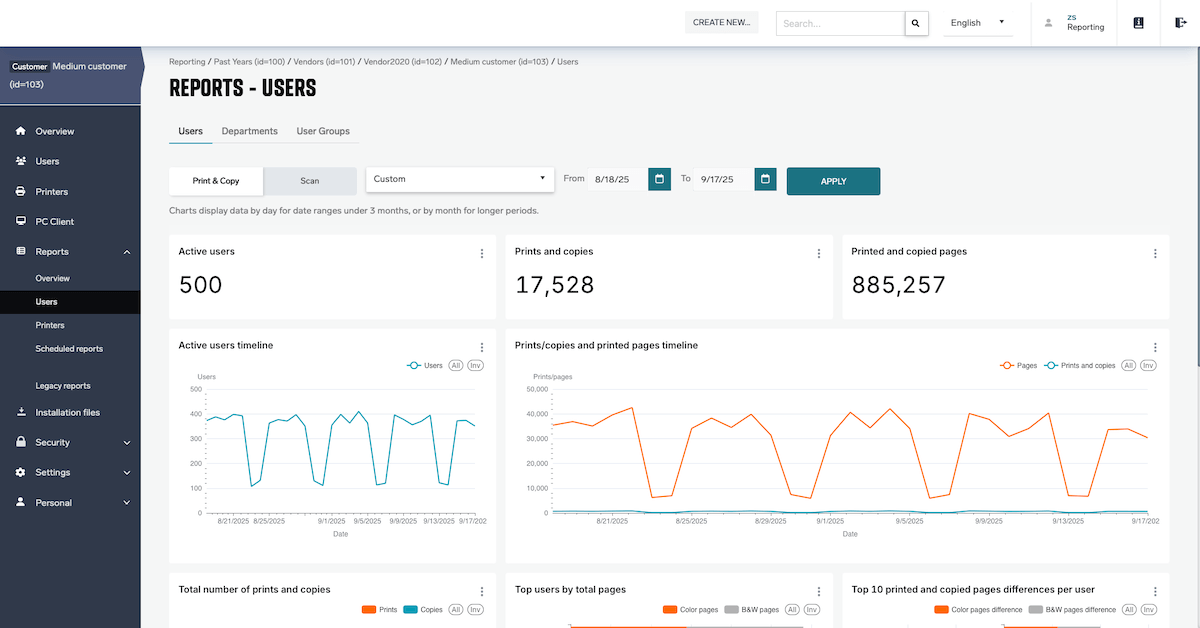
Businesses that adopt print management software often find they save more from improved oversight than from reduced volume.
To learn more, check out our blog, Print Management Software: What is It?
When an Entry-Level Production Printer Unlocks New Revenue
For some organizations, printing is both a cost-saving opportunity and a means to generate revenue.
Entry-level production printers are used by:
- Churches (programs, event materials)
- Schools (yearbooks, sports programs, marketing materials)
- Restaurants (menus, table cards)
- Marketing departments
- Real estate offices
- Nonprofits
- Small in-plant print shops
These organizations often end up providing printed goods not just for internal use but to support events, fundraisers, or even other departments.
Entry-level production printers like the PrimeLink C9275 or Versant 280 are the sweet spot between office quality and true commercial output. However, they don’t have the cost of high-volume production presses.
Questions to Ask When Evaluating ROI
If you want to determine whether your current device is performing the way it should, ask yourself:
- How much are we outsourcing each month?
- Are we paying rush fees or shipping fees?
- Do we regularly reprint materials due to mistakes?
- Do we print marketing pieces internally? Should we?
- Are our current devices producing the quality we need?
- Could our team work more efficiently with better devices or software?
- Do we have visibility into what printing actually costs us?
If these questions resonate with you, you may also be interested in: Is a Production Printer Right for Your Business? + Costs.
Making Printing Work Harder for Your Business
Your printing environment touches more areas of your business than you may realize, from marketing to operations to IT efficiency. When managed well, your copier/printer is a tool that can support growth, reduce waste, and unlock new possibilities.
Are you looking to take the next step toward improving your ROI and understanding how your printing environment is functioning today? A great place to start is learning about Managed Print Services.
Read 5 Reasons You Need Managed Print Services to help you understand how much control you can gain over printing costs, how to track your environment more effectively, and whether MPS is the right fit for your organization.