Skip to main content


Have you ever had a printer mysteriously “act up” after someone changed a setting or discovered a security feature turned off without anyone knowing? Misconfigurations are one of the most common causes of security vulnerabilities in office technology. Something as simple as an incorrect setting can lead to a cybersecurity incident.
Printers are no exception; in fact, they’re some of the most vulnerable devices. It’s easy for settings to get tweaked, features to get disabled, and security gaps to quietly open. Most teams don’t realize anything happened until IT is troubleshooting or a risk assessment reveals an exposure.
This is where Xerox’s Configuration Watchdog becomes a powerful safety net for organizations that rely on secure, well-managed print environments.
Before we get into the details, the goal of this blog is simple:
To help you understand what Configuration Watchdog is, how it works, whether your Xerox printer uses it, and why it matters for your overall security posture. As a Xerox partner, we help businesses and organizations navigate these features every day, and what often surprises customers is how automated and hands-off this protection really is.
Table of Contents
- What Is Xerox’s Configuration Watchdog Security System?
- How Configuration Watchdog Works
- Why Configuration Watchdog Matters for Businesses
- Real-World Scenarios Where Watchdog Prevents Problems
- How Watchdog Fits Into Xerox’s Larger Security Framework
- How Administrators Can Enable or Customize Watchdog
- Who Benefits Most From This Security Feature?
- Conclusion: Strengthen Your Print Security With Smarter Tools and Support
What Is Xerox’s Configuration Watchdog Security System?
Xerox’s Configuration Watchdog is an automated security feature built into modern Xerox printers. These include VersaLink, AltaLink, and PrimeLink models with ConnectKey technology. Its entire purpose is to keep your printer’s security settings exactly the way your IT team intended.
You can think of it as a guardrail system:
- It continuously monitors all critical configuration settings.
- If someone intentionally or accidentally changes something, the system detects the change.
- It automatically restores the correct, secure setting so the device stays compliant.
For example, on the AltaLink 8200 Series, Watchdog monitors up to 75 settings, including security policies, authentication, encryption, network protocols, and more. When a setting shifts out of alignment, Watchdog remediates it and logs the event for administrators to review.
In other words, you don’t have to keep guessing, wondering who turned something off, or waiting for issues to appear.
How Configuration Watchdog Works
The easiest way to understand Watchdog is to break down its cycle:
It Monitors Configuration Settings Continuously
The printer compares its active settings to a secure “baseline” defined by your administrator. This baseline becomes the standard your device must always adhere to.
- It Detects Any Unauthorized or Unexpected Change
Whether someone disables encryption, alters network settings, or changes authentication requirements, Watchdog catches it. Changes are detected during the next scheduled or manual check.
It Automatically Remediates the Issue
Instead of waiting for IT to fix the problem manually, the printer corrects it immediately. Your approved security standard is restored without downtime.
It Logs the Event and Can Send Alerts
Administrators can view a list of remediated items, and if email alerts are enabled, they’ll be notified whenever Watchdog intervenes.
This level of automation dramatically reduces the risk that a device strays from company policy. Unfortunately, this happens far more often than most teams realize.
Why Configuration Watchdog Matters for Businesses
For many organizations, security is more of a priority than managing printers. However, printers sit on your network, handle sensitive documents, and often store temporary data. One configuration mistake can become a doorway for a cyber threat.
Watchdog can protect you from:
Unauthorized Access
Accidental changes can expose ports, disable authentication, or weaken encryption. Watchdog closes that window immediately.
Internal Misconfigurations
Employees sometimes adjust settings without understanding the consequences. Automation prevents these mistakes from becoming vulnerabilities.
Malicious Tampering
Whether from malware or a bad actor, any attempt to “open up” the system hits a wall.
Compliance Risks
Industries like healthcare, education, and finance rely on consistent policies. Watchdog ensures settings stay aligned with those requirements day after day.
If you want to explore more common security gaps, you may find our blog 5 Common Printer Security Mistakes (With Solutions) especially helpful.
Real-World Scenarios Where Configuration Watchdog Prevents Problems
Sometimes the most helpful way to understand a security feature is to look at what would happen without it.
Scenario 1: Encryption Gets Turned Off
A staff member troubleshooting a print issue disables encryption temporarily and forgets to turn it back on. Without Watchdog, your documents may now be transmitted unencrypted.
With Watchdog?
The device detects the change and restores encryption automatically.
Scenario 2: Network Settings Are Modified
A small change in IP configuration or port access could expose the device to outside traffic. This happens more often than you’d think.
Watchdog instantly returns the setting to match your approved security baseline.
Scenario 3: Someone Attempts to Bypass Authentication
For organizations using secure print or user logins, removing authentication even briefly creates a privacy risk.
Watchdog blocks the drift and alerts administrators.
This kind of proactive response is especially valuable in verticals like schools and hospitals, where sensitive documents sit in print queues all day. Check out our following blogs for a deeper dive into how systems like this support compliance.
- Protect Student Data: Enhance Printer Security in Schools
- Enhancing Patient Privacy: Printer Security in the Healthcare Industry
- Printer Security in the Legal Environment: How You Can Implement It
How Watchdog Fits Into Xerox’s Larger Security Framework
Xerox takes a layered approach to printer security, and Configuration Watchdog is one piece of a much bigger puzzle.
Here’s how it connects to other Xerox protections:
- Allowlisting ensures only approved applications run.
- Trellix (formerly McAfee) Embedded Control prevents unauthorized changes to printer software.
- Automatic Firmware Verification checks the integrity of the system at startup.
- Secure Print + User Authentication keep documents protected even after printing.
Watchdog doesn’t replace these tools, it complements them by safeguarding the configuration layer while the others handle applications and firmware. Together, they create an end-to-end defense model that’s hard for attackers to exploit.
Learn more about Xerox’s approach to printer security here.
How Administrators Can Enable or Customize Watchdog
The feature is built into most modern Xerox devices and doesn’t require an add-on or license.
To get started:
- Visit the Embedded Web Server or admin console
- Verify that Watchdog is enabled
- Set or confirm your secure baseline configuration
- Turn on email notifications if desired
- Review remediated changes periodically
- Include Watchdog checks in routine security reviews
For extra protection, pairing Watchdog with a strong firmware update schedule is wise. If that’s an area you’re exploring, our guide Should You Update Your Printer’s Firmware? can help clarify the why and when.
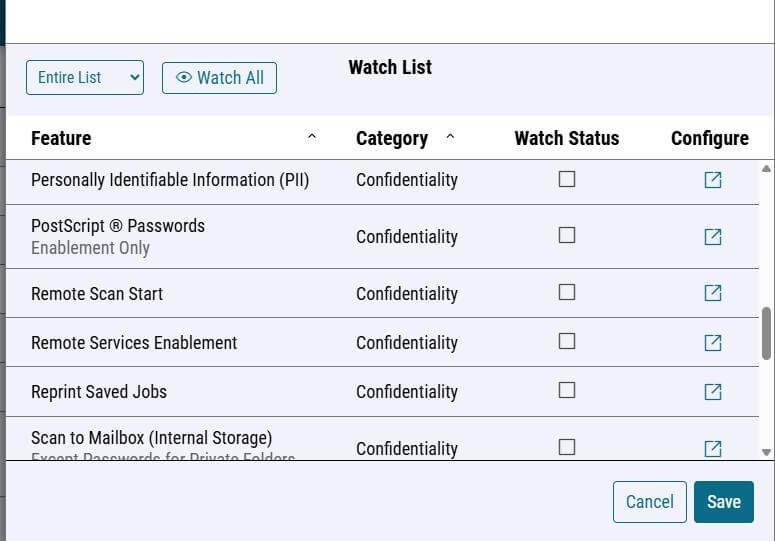
Below is a screenshot of a Configuration Watchdog watch list.
Who Benefits Most From This Security Feature?
While any business can benefit from automated security monitoring, Watchdog is especially helpful for:
- IT-strained teams who don’t have time for constant printer oversight
- Organizations with multiple locations needing consistent configurations
- Schools, hospitals, and legal offices handling sensitive data
- Growing businesses that want set-it-and-forget-it security
- Companies using managed print services (MPS) where baseline consistency is critical
If your environment fits one of these categories, Watchdog may be more impactful than you realize.
Strengthen Your Print Security With Smarter Tools and Support
Printer security doesn’t have to feel overwhelming or require constant hands-on management. Xerox’s Configuration Watchdog gives your organization a practical way to maintain compliance, prevent vulnerabilities, and stay ahead of configuration drift. This can help take the extra work off your IT team.
And if you’re considering upgrading to newer devices or switching brands, Watchdog is one of those built-in protections that can make a big difference. It’s included on modern Xerox printers, integrates seamlessly with security tools like Y Soft and PaperCut, and helps ensure your environment stays secure long after setup.
For many organizations, this kind of automated security is also a sign that it may be time to rethink how their entire print environment is managed. If you're exploring a more streamlined, cost-efficient approach, you should consider whether Managed Print Services is right for your business. It’s often the next move for businesses that want security, consistency, and less IT strain.
If you prefer to talk directly, you can always contact STPT. We can help secure your print environment or choose the right Xerox device for your organization.
If you’re looking for more ways to protect your devices today, our guide 5 Ways to Protect Your Printer from Cyberattacks offers practical tips you can implement right away.